Keep the numbers customers know
Check porting eligibility early, map DDIs and decide which numbers, teams and caller IDs are needed before the migration is scheduled.
Replace ageing phone lines or an inflexible phone system with a business VoIP telephone system built around how your people actually work. Keep your business numbers and choose the right mix of VoIP phones, desktop apps and mobile users, with a planned migration and ongoing support.

For an SME, the benefit is usually more than replacing a phone line. A good VoIP telephone system can simplify moves and changes, reduce missed calls, give teams more flexible ways to answer calls and provide a cleaner route away from legacy services. The design starts with users, numbers, call patterns, sites and connectivity.
Check porting eligibility early, map DDIs and decide which numbers, teams and caller IDs are needed before the migration is scheduled.
Give reception and fixed desks physical Yealink phones where useful, while hybrid, remote and mobile staff can use Linkus desktop or mobile clients.
Configure opening hours, hunt groups, queues, overflow, voicemail and routing so inbound calls reach the right people instead of simply ringing a desk.
Assess bandwidth, latency, jitter, packet loss and resilience so voice quality and business continuity are considered before the system goes live.
Moving voice onto IP should improve how calls move around the business, not simply replace the line underneath an old setup. We review connectivity, resilience, users, numbers and routing before migration.
Browse Yealink handset options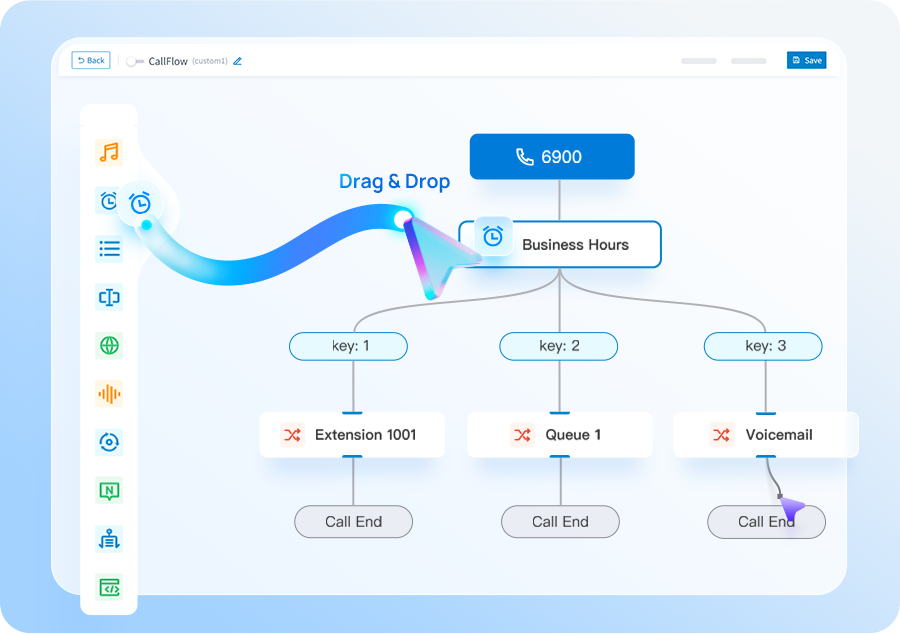
List users, numbers, extensions, sites, analogue devices, current contracts and existing call flows. Identify what needs to change and what needs to stay.
Choose the PBX approach, endpoints, SIP capacity, routing, connectivity and resilience around actual usage, including office, hybrid and mobile users.
Build the system and test inbound and outbound calls, numbers, routing, queues, apps, handsets, failover and emergency calling before the migration date.
Port numbers in a controlled window, support users through go-live and review the system and call data afterwards so issues can be resolved quickly.
Choose this route when you need a complete VoIP telephone system rather than simply replacing an external phone line. It suits SMEs that want business calling across office, desktop and mobile users with a planned migration and support around the service.
You are replacing legacy PSTN or ISDN-era services, moving away from an ageing PBX, supporting hybrid or remote staff, consolidating sites, keeping established business numbers or improving call handling that has become difficult to manage.
Compare the solution against what you actually need. If your existing PBX is still suitable and only the external connectivity needs replacing, SIP trunks may be the cleaner change. If you want a broader cloud-based phone-system proposition, compare the cloud phone system option. If you specifically want Yeastar architecture and its associated features, the P-Series route may be more appropriate. For a wider review of phone-system options, start with the business phone systems proposition.
Tell us what you have today and what needs to improve. We’ll explain the options and recommend the setup that best fits your business.
We plan number porting, call flows, connectivity and user training before the system goes live.
These pages cover the questions that usually sit next to this decision, without making you work through a glossary first.
Need the number first? See how a UK virtual business number can route to desk, desktop or mobile users.
Compare number ownership, support, resilience, endpoints and real operating cost.
A practical look at free calls, free PBX software and the costs that remain.
We’ll use the information to size the setup and make the first conversation useful.
Use these guides to understand migration, system options and capacity before you get in touch.
Cloud, appliance/software and Yeastar + Teams integration compared by operating model.
See the main stages involved in moving business numbers to a new provider.
Estimate a sensible starting point from concurrent-call demand rather than user count alone.
Bring desk, desktop and mobile users into one joined-up business communications environment.
Short answers to the questions we are most often asked about this type of system.
A VoIP telephone system uses an internet or IP network to carry business calls rather than relying on traditional telephone lines. For an SME, the important part is how the system is designed around users, numbers, phones, call routing and connectivity.
Yes, provided the system is sized and configured around the business rather than sold as a generic licence bundle. SMEs can combine desk phones, softphones and mobile use on one platform and scale the setup as their requirements change.
Usually. We check number portability with the current range holder and map the required numbers before a migration date is agreed, so the porting process can be planned rather than treated as a last-minute change.
The overall solution can depend on the number of users, desk phones and other endpoints, SIP capacity, connectivity, number porting, installation, configuration and ongoing support. The right combination depends on how the business actually uses its phones.
Not always. Some roles benefit from Yealink desk phones, while others may be better served by Linkus desktop or mobile clients. Existing SIP devices can be assessed for compatibility before replacement is recommended.
Voice quality depends on bandwidth, latency, jitter, packet loss and network design. We assess connectivity and resilience as part of the phone-system design rather than treating the internet connection as separate from the voice service.