Choose the operating model
Use appliance, software or cloud options where appropriate to the control and support model.
Deploy a Yeastar P-Series PBX with Yealink endpoints, SIP connectivity, Linkus apps and Microsoft Teams integration where it improves the user workflow, all designed as one phone system.

Yeastar can support Yealink desk phones, Linkus softphones, mobile users, queues, reporting and Microsoft Teams integration. The design work is deciding which interface and feature set each role actually needs.
Use appliance, software or cloud options where appropriate to the control and support model.
Design reception, departments, overflow, opening hours and voicemail before users go live.
Give supported users desktop, web and mobile calling without creating a separate phone identity.
Size trunks and resilience alongside the PBX so the whole voice path is engineered together.
For supported P-Series deployments, selected users can work from Microsoft Teams while Yeastar remains the phone-system core and Yealink endpoints stay in the mix.
Use supported inbound queues, agent and supervisor tools, wallboards, reporting, outbound workflows and digital messaging where customer-facing teams need more than standard PBX call handling.
Yeastar can bring PBX call handling, Linkus clients, Yealink endpoints, integrations and contact centre capabilities into one platform. The design decision is which of those tools each role genuinely needs.
Browse Yealink handset options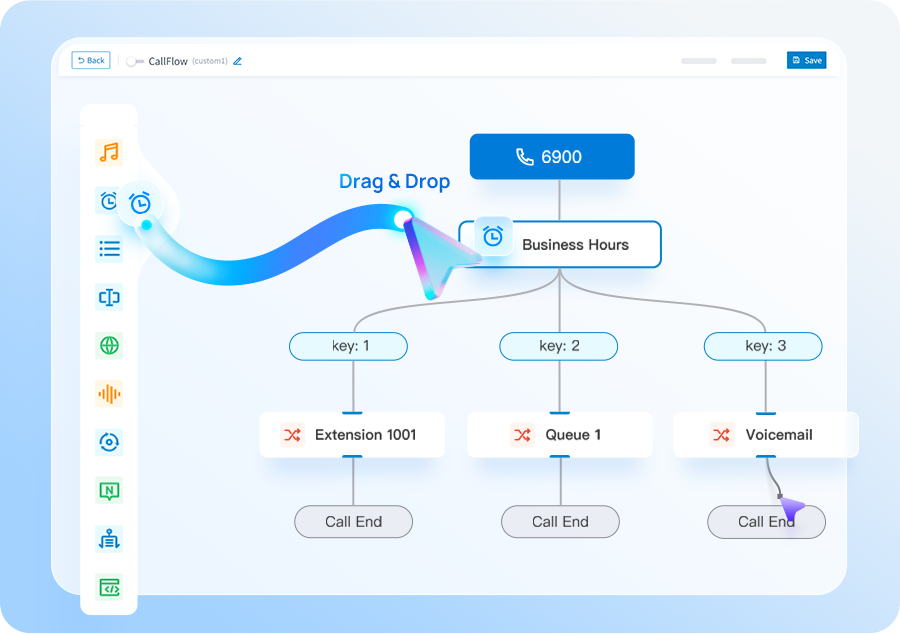
Yeastar P-Series supports ready-made CRM integrations and custom REST API integrations, so the phone system can sit closer to the tools your sales and service teams already use.
Current P-Series integrations include HubSpot, Salesforce, Zoho CRM, Microsoft Dynamics 365, Odoo and Bitrix24. The exact features depend on the CRM, P-Series edition and software version, so we confirm compatibility as part of the system design.
Let supported users start calls from numbers inside the CRM rather than re-keying them into a handset or app.
Open the matching CRM contact when a recognised customer calls, helping users get useful context before or during the conversation.
Supported integrations can synchronise call activity and customer interaction records so teams spend less time entering the same information twice.
If your CRM is not one of the ready-made options, Yeastar also supports custom CRM integration templates for compatible systems with a REST API.
Tell us which platform, edition and workflow your team uses. We will check the supported Yeastar integration route before it becomes part of the proposal.
Separate reception, queue agents, general users, remote users and administrators.
Match P-Series architecture and feature set to the organisation.
Configure queues, auto attendants, recording and supported business integrations.
Validate calling and resilience, then train admins and users before go-live.
Yeastar is compelling when you want a feature-rich PBX with deployment flexibility, practical administration and room to add contact centre capability for customer-facing teams.
You want strong PBX call handling, Linkus apps, deployment choice, Yealink endpoints, SIP trunking and optional Microsoft Teams integration while keeping Yeastar as the phone-system core.
If your only requirement is basic calling with no meaningful PBX workflow, a simpler hosted option may deserve comparison. If Teams is important, we can still keep Yeastar as the PBX and integrate Teams for the users who need it.
Tell us what you have today and what needs to improve. We’ll explain the options and recommend the setup that best fits your business.
We plan number porting, call flows, connectivity and user training before the system goes live.
We’ll use the information to size the setup and make the first conversation useful.
Use these guides to understand migration, system options and capacity before you get in touch.
Cloud, appliance/software and Yeastar + Teams integration compared by operating model.
See the main stages involved in moving business numbers to a new provider.
Estimate a sensible starting point from concurrent-call demand rather than user count alone.
See how queues, agent tools, wallboards, reporting and supported messaging can extend a P-Series deployment.
Keep Yeastar at the core while selected users make and receive PBX calls from Teams.
Short answers to the questions we are most often asked about this type of system.
P-Series is Yeastar's business communications platform, available in different deployment models and supporting PBX features, apps, call handling and integrations.
Yes. Yeastar PBX systems can connect to supported SIP trunk services. Trunk compatibility and configuration should be validated as part of deployment.
Supported Linkus clients can allow users to make and receive business calls away from a desk phone, subject to system configuration and licensing.
Yes. Supported Yeastar P-Series deployments can integrate Linkus with Microsoft Teams so users can work from Teams while the Yeastar PBX continues to provide the underlying phone-system features. Exact licensing and version requirements should be checked for the chosen integration method.
No. Zero’s core proposition is Yeastar PBX systems, Yealink endpoints and SIP connectivity. Microsoft Teams is an optional integration layer where it suits the user workflow.
Yes. Current P-Series ready-made CRM integrations include HubSpot, Salesforce, Zoho CRM, Microsoft Dynamics 365, Odoo and Bitrix24. Supported features can include click-to-call, caller pop-ups, contact synchronisation and call-record synchronisation. Custom CRM templates are also available for compatible REST API systems.