Build detailed PBX logic
Create ring strategies, queues, schedules, IVR and overflow behaviour from one central platform.
Run extensions, call routing, queues and administration from a hosted PBX while users work from office phones, desktop apps or mobiles. A cloud PBX gives the business one call-control layer without putting a PBX appliance in every office.

A cloud PBX is most useful when you need clear control over extensions, trunks, routing rules, queues, recording, permissions, integrations and multi-site administration.
Create ring strategies, queues, schedules, IVR and overflow behaviour from one central platform.
Centralise users and routing while allowing each location to keep the endpoint mix and numbers it needs.
Use supported CRM, directory or Teams integrations where they remove duplicate work for users.
Give authorised administrators visibility into users and call handling without maintaining PBX hardware at each site.
A cloud PBX can bring extensions, queues, permissions and routing under one administration model while different locations keep the endpoint mix and local call handling that suit them.
Browse Yealink handset options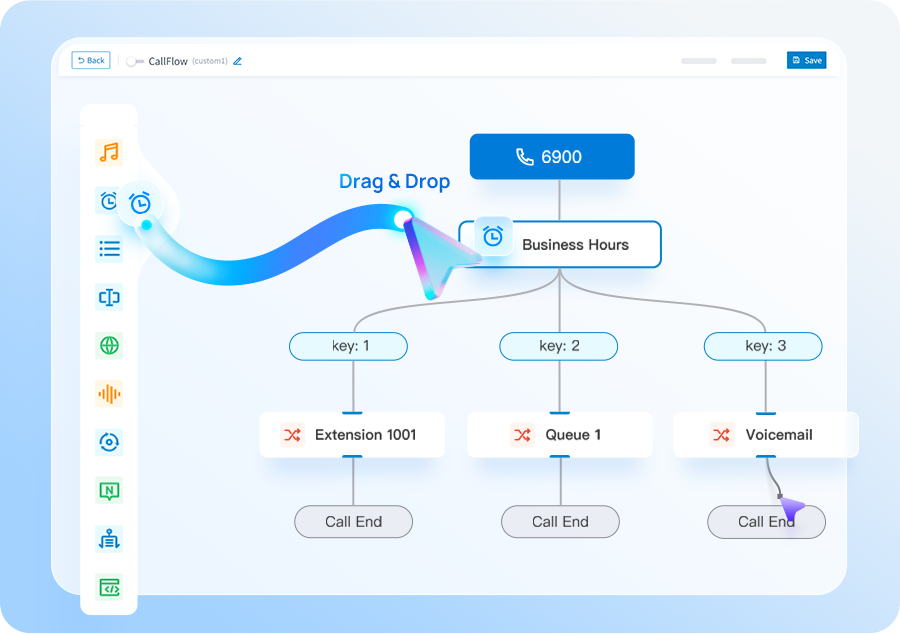
Document departments, numbers, queues, permissions, recording and escalation.
Confirm the cloud PBX model, licensing and management responsibilities.
Provision endpoints, Linkus users, SIP connectivity and supported integrations.
Prove both user calling and the day-to-day admin tasks your team will actually perform.
Cloud PBX suits SMEs that need more explicit PBX control than a basic hosted-phone bundle but do not want a separate physical PBX appliance at every location.
You need centralised PBX configuration, multi-site routing, richer call handling, reporting or integrations and want the core platform hosted.
If simplicity and provider management matter more than PBX-level control, compare Hosted VoIP/Hosted Telephony. If you prefer appliance or software deployment choice, see Yeastar P-Series.
Tell us what you have today and what needs to improve. We’ll explain the options and recommend the setup that best fits your business.
We plan number porting, call flows, connectivity and user training before the system goes live.
These pages cover the questions that usually sit next to this decision, without making you work through a glossary first.
A plain-English explanation of PBX, IP PBX, hosted PBX and virtual PBX.
Compare cloud phone systems with other SME phone-system approaches.
Choose a more managed operating model when day-to-day support matters most.
We’ll use the information to size the setup and make the first conversation useful.
Use these guides to understand migration, system options and capacity before you get in touch.
Cloud, appliance/software and Yeastar + Teams integration compared by operating model.
See the main stages involved in moving business numbers to a new provider.
Estimate a sensible starting point from concurrent-call demand rather than user count alone.
Bring desk, desktop and mobile users into one joined-up business communications environment.
Short answers to the questions we are most often asked about this type of system.
A cloud PBX provides PBX functions such as extensions, routing, queues and administration from a hosted platform rather than a traditional PBX installed at each office.
The terms overlap. Cloud PBX usually puts more emphasis on PBX-level control, while hosted VoIP is often delivered as a broader managed phone service.
Yes. A well-designed system can centralise dial plans and routing while supporting users and numbers across different locations.
Supported integrations depend on the PBX platform and deployment. With Yeastar P-Series, Teams integration can be designed for users who benefit from working inside Teams.